PS5 Update 14.0: Major Enhancements for Gamers
Understanding the PS5 Update 14.0 and Its Impact on Games
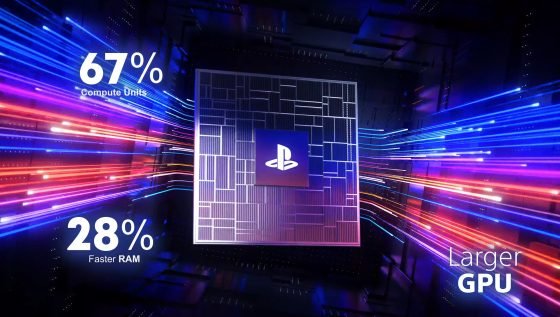
The gaming landscape constantly evolves, and recent updates are fundamental in enhancing user experience. Sony’s PlayStation 5 (PS5) enthusiasts have just received a significant boost with the rollout of Update 14.0, which debuted on April 16, 2024. Focused on enriching the gaming experience, this update targets both the standard PS5 and, more prominently, the PS5 Pro version.
Core Enhancements in Update 14.0
The highlight of this update is the automatic activation of the “Improve PSSR Image Quality” feature, optimizing compatible games to leverage the advanced upscaling technology of Sony. This means that titles developed for previous versions can now benefit from enhanced image processing, resulting in sharper visuals and a smoother gaming experience.
Moreover, this new update sharpens the clarity of images and offers improved stability during motion sequences, addressing a critical area where many gamers seek excellence. The updated PSSR technology uses artificial intelligence to analyze image frames and reconstruct them at higher resolutions, similar to NVIDIA’s DLSS and AMD’s FSR technologies.
Striking Features for All Users
- Automatic PSSR activation for enhanced gaming visuals.
- Voice chat indicator allowing users to see who is speaking.
- New Community Activity Widget showcasing trending games.
While PS5 Pro users will notice the most significant improvements, standard PS5 users also benefit from additional features that enhance overall functionality.
Benefits of Update 14.0 for Gaming
This update revolutionizes how games are presented on PS5 consoles, delivering several key benefits:
- Enhanced Visuals: Improved clarity and stability during gameplay.
- Seamless User Experience: Automatic settings reduce player workload.
- Community Engagement: New widgets promoting popular games.
Limitations and Considerations
While Update 14.0 delivers substantial enhancements, there are certain limitations worth noting. Some users may need to check compatibility with older titles to fully utilize the advantages offered. Furthermore, the update primarily aims to optimize the gaming experience for PS5 Pro users.
Common Mistakes to Avoid with the Update
- Ignoring compatibility checks for older games before updating.
- Forgetting to explore new features after installation.
- Overlooking the training of AI features for optimal performance.
Best Practices for Utilizing the Update
To make the most out of this update, players should:
- Regularly check for new patches to maintain performance.
- Fully configure new features in their settings.
- Engage with the community to share insights and experiences.
Future Trends in Gaming Updates
The ongoing evolution of gaming technology signals that future updates will increasingly rely on AI and machine learning to enhance visuals and performance. Players can anticipate updates that deepen immersion and connectivity across platforms.
Final Thoughts on PS5 Update 14.0 for Games
In summary, the PS5 Update 14.0 signifies a major leap in providing gamers with improved performance and visual experiences. As players explore the new features, the gaming community is set to witness an enriching technological landscape for years to come.
FAQ
What is the main feature of PS5 Update 14.0?
The primary highlight is the automatic activation of the “Improve PSSR Image Quality” feature, enhancing graphics performance across compatible games.
Will standard PS5 users benefit from the update?
Yes, while the focus is on PS5 Pro, standard users will also enjoy additional features such as enhanced chat functions and community activity tracking.
How does the updated PSSR technology work?
The updated PSSR uses AI to analyze frames and reconstruct images at higher resolutions, improving visual fidelity and stability.
Are there any limitations in the update?
Some games may not be compatible with the new enhancements, and older titles might require manual configuration to optimize visual settings.
What best practices should I follow after the update?
Regularly check for update patches, explore new settings, and engage with community insights for a better gaming experience.
What future updates can we expect in gaming?
Future updates will likely focus on further integrating AI and machine learning to enhance graphics and overall playability.












Post Comment