LG’s Revolutionary 1000Hz Gaming Monitor: A Deep Dive into Technology
Unveiling the Technology Behind LG’s 1000Hz Gaming Monitor
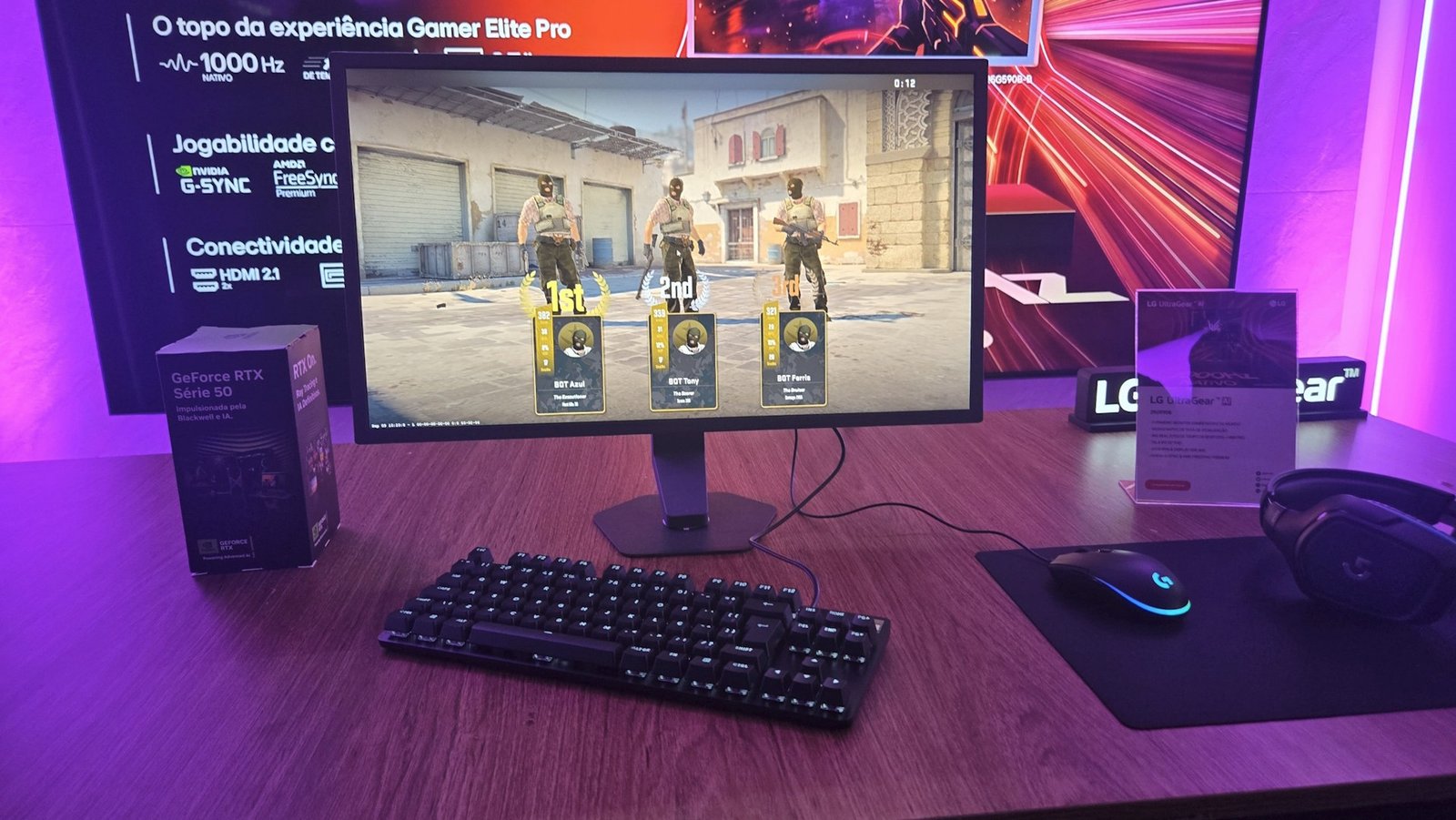
The gaming landscape is evolving rapidly, and LG has stepped into the spotlight with the introduction of the UltraGear 25G590B, the world’s first gaming monitor to offer a staggering 1000Hz refresh rate. This groundbreaking piece of technology is not just about numbers; it’s about transforming the gaming experience entirely, enhancing responsiveness, and reducing latency to unprecedented levels.
As gamers demand more from their hardware, LG’s latest offering indicates a significant leap forward in monitor capabilities. With its 25-inch IPS panel and impeccable 1ms response time (GTG), the UltraGear 25G590B aims to redefine competitive gaming.
What Makes the 1000Hz Refresh Rate Significant?
The significance of a 1000Hz refresh rate lies in its ability to deliver fluid motion and ultra-smooth gameplay, particularly during fast-paced action sequences. This technology allows gamers to see more frames per second, immensely improving the visibility of movements and actions on screen. Traditional gaming monitors, typically 144Hz to 240Hz, struggle to match the responsiveness of the UltraGear, providing LG with a competitive edge in the market.
Additionally, the NVIDIA G-Sync and AMD FreeSync Premium technologies included in this monitor further enhance gaming experiences by minimizing screen tearing and stuttering, ensuring that every frame is perfectly synchronized with the graphics card.
Benefits of LG’s 1000Hz Gaming Monitor
- Exceptional Motion Clarity: The higher refresh rate dramatically reduces motion blur, making fast actions appear smoother.
- Competitive Advantage: Gamers can react more quickly and accurately, crucial for competitive play.
- Enhanced Color and Brightness: LG’s IPS technology provides vibrant colors and wide viewing angles, making it suitable for immersive gaming sessions.
Potential Limitations
While the technology is advanced, there are limitations. Not all games or graphics cards support such high refresh rates, meaning gamers might need to invest in more powerful hardware to fully utilize the monitor’s capabilities. Additionally, the higher refresh rate may also come at a premium price, which could be a barrier for some consumers.
Common Errors When Choosing Gaming Monitors
- Focusing solely on refresh rates without considering resolution.
- Ignoring response times, which can affect gameplay experience.
- Overlooking features like adaptive sync technologies that enhance performance.
Best Practices for Gamers
To maximize the potential of the UltraGear 25G590B, consider the following:
- Ensure your gaming setup includes a capable graphics card that can output high refresh rates.
- Calibrate your monitor settings for optimal color and brightness.
- Utilize the adaptive sync features to reduce visual artefacts during gameplay.
Future Trends in Gaming Monitor Technology
The benchmark set by LG’s 1000Hz monitor could pave the way for even more advancements in display technologies. As competitive gaming continues to gain traction, manufacturers may push for higher resolutions and refresh rates while integrating features like OLED technology and enhanced AI-based calibration systems.
Conclusion: The Future of Gaming Technology with LG
LG’s introduction of the 1000Hz gaming monitor signifies a leap forward in gaming technology, blending impressive stats with practical applications to enhance user experience. For gamers looking to elevate their game, the UltraGear 25G590B represents a tangible way to gain a competitive edge.
FAQ
What is the refresh rate of LG’s new gaming monitor?
The LG UltraGear 25G590B features an impressive refresh rate of 1000Hz, making it the first monitor of its kind in the world.
Why is a higher refresh rate important for gaming?
A higher refresh rate provides smoother motion, reducing motion blur and increasing responsiveness during fast-paced gaming scenarios.
Is the LG UltraGear 25G590B suitable for all gamers?
While it offers groundbreaking technology, gamers should have compatible hardware to utilize such high refresh rates effectively.
What technologies enhance gameplay on the UltraGear monitor?
The monitor includes NVIDIA G-Sync and AMD FreeSync Premium technologies to minimize screen tearing and ensure fluid gameplay.
Are there any downsides to this monitor?
Potential downsides include higher costs and the necessity for powerful hardware to fully benefit from the 1000Hz refresh rate.
What should I look for when buying a gaming monitor?
Consider refresh rates, response times, resolution, and features like adaptive sync technologies for the best gaming experience.













Post Comment