Samsung ViewFinity S7: Productivity Monitor Previews & Specs
In an era where remote work and digital creation demand increasingly sophisticated tools, the quality of a display can significantly impact productivity, comfort, and creative output. Professionals across various sectors – from graphic design to data analysis, video editing to software development – understand that a monitor is far more than just a screen; it’s a window into their work, an extension of their capabilities. Samsung, a global leader in display technology, consistently innovates to meet these evolving demands, pushing the boundaries of what monitors can offer.
Today, October 10, marks another pivotal moment in this journey, as Samsung expands its ViewFinity line with the introduction of the S7 model. This new monitor is not merely an addition to their extensive catalog; it represents a strategic focus on delivering a comprehensive solution tailored specifically for the rigors of professional use. Designed from the ground up to offer a potent blend of image quality, ergonomic features, and crucial connectivity options, the ViewFinity S7 aims to be a cornerstone for anyone whose work relies heavily on visual precision and sustained focus.
This launch invites a closer examination, providing initial previews into a device that promises to reshape daily workflows for many. What makes the ViewFinity S7 stand out in a crowded market? How do its technical specifications translate into tangible benefits for the user? And what does this release signify for the broader landscape of professional displays? We delve into these questions, offering a detailed perspective on Samsung’s latest offering and exploring why the ViewFinity S7 is poised to capture the attention of productivity-minded individuals seeking an upgrade to their digital workspace.
Exploring the Samsung ViewFinity S7: An Exclusive Productivity Previews
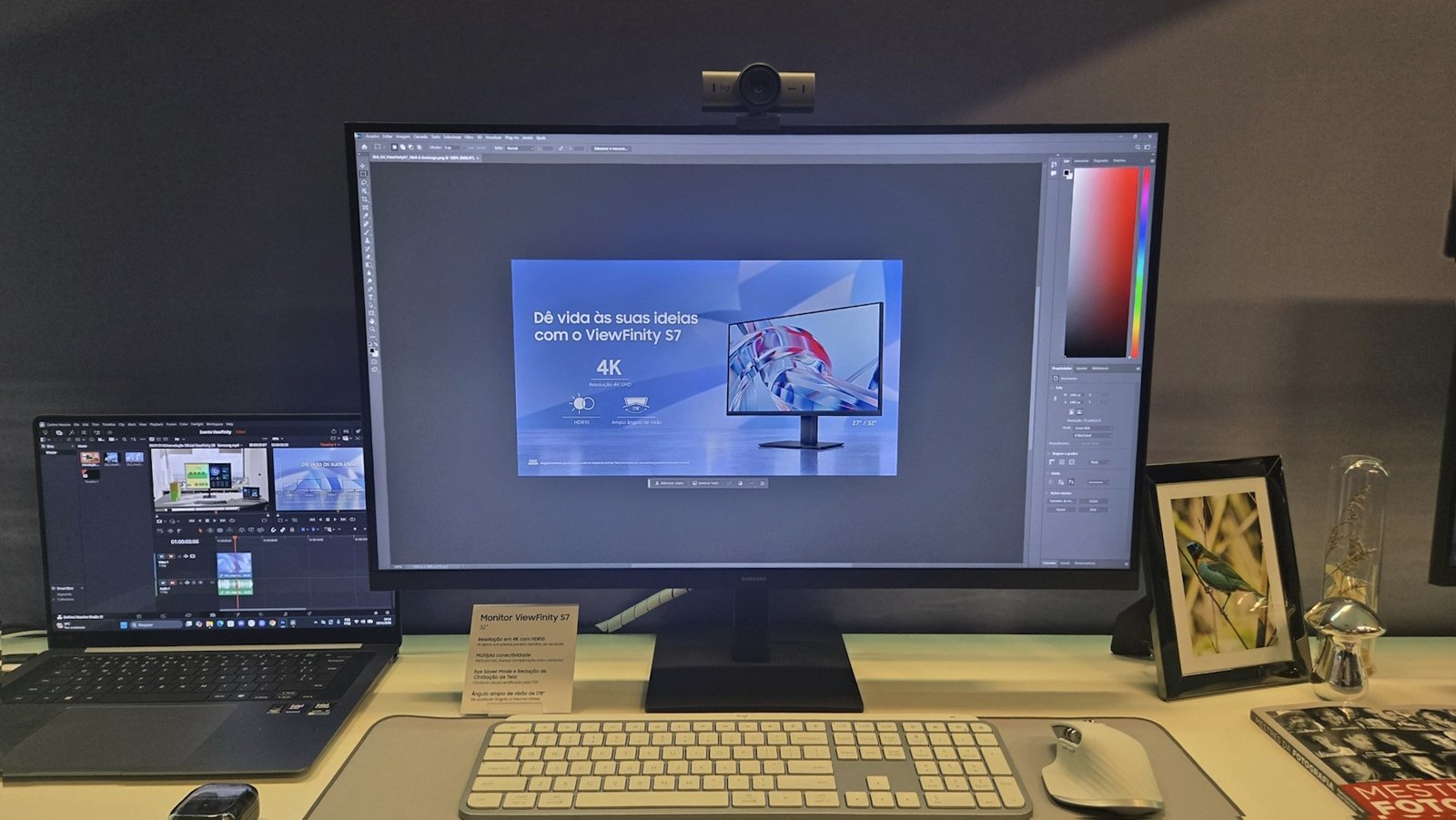
The Samsung ViewFinity S7 emerges as a dedicated tool for professionals, prioritizing a seamless blend of visual clarity, essential connectivity, and user comfort. Launched on October 10, this 32-inch monitor with a 4K (3840 x 1260 pixels) VA panel and HDR10 support offers a crisp visual experience, further enhanced by features like Eye Saver Mode and flicker reduction for prolonged use. It integrates HDMI 2.0 and DisplayPort 1.2, providing versatile connection options for diverse professional setups.
At the heart of the ViewFinity S7’s design is its commitment to maximizing efficiency and reducing common strains associated with extended screen time. The choice of a 32-inch display provides ample screen real estate, crucial for multitasking and managing complex applications simultaneously. This generous size allows professionals to open multiple windows side-by-side without feeling cramped, enhancing overall workflow and reducing the need to constantly switch between tasks.
The VA (Vertical Alignment) panel technology employed in the S7 is a deliberate choice for productivity. VA panels are renowned for their superior contrast ratios and deeper blacks compared to other panel types, which can be particularly advantageous for tasks involving intricate details, color grading, or simply appreciating visually rich content without washed-out colors. This inherent capability helps render images and text with striking clarity and depth, making long hours of work more engaging and less fatiguing.
Furthermore, the monitor boasts a 4K resolution, specified by Samsung as 3840 x 1260 pixels. While an unusual interpretation of 4K, this high pixel density means that on-screen content is rendered with exceptional sharpness, making text incredibly crisp and images highly detailed. This level of fidelity is indispensable for professionals in fields such as graphic design, architecture, or any discipline where precision and the ability to discern fine elements are paramount. The combination of a large screen and high resolution ensures that every detail is visible, facilitating accurate work and reducing potential errors that might arise from blurry or pixelated visuals.
The integration of HDR10 support further elevates the visual experience. High Dynamic Range (HDR) technology expands the range of both contrast and color significantly. With HDR10, the ViewFinity S7 can display a broader spectrum of colors and a more nuanced range of light and shadow, resulting in a more vibrant and lifelike image. For content creators, video editors, and photographers, this translates into more accurate color representation and a greater ability to work with high-quality media files, ensuring their output precisely matches their creative vision.
Key Specifications of the Samsung ViewFinity S7 Monitor
Understanding the core technical specifications is vital for any professional considering a new display. The Samsung ViewFinity S7 brings a focused set of features designed to support its productivity-centric mission.
- Screen Size: 32 inches, offering substantial workspace.
- Panel Type: VA (Vertical Alignment), known for excellent contrast.
- Resolution: 4K (3840 x 1260 pixels), delivering high clarity.
- Refresh Rate: 60 Hz, standard for professional applications.
- Response Time: 5 ms (GTG – Gray-to-Gray), suitable for precise work.
- HDR Support: HDR10, enhancing color and contrast for vivid visuals.
- Eye Comfort: Eye Saver mode (blue light reduction) and Flicker Reduction technology.
- Connectivity: 1x HDMI 2.0 port, 1x DisplayPort 1.2, and headphone output.
These specifications combine to create a monitor that excels in visual output and user comfort. The 60 Hz refresh rate and 5 ms GTG response time are perfectly adequate for professional tasks, where smooth motion is less critical than image fidelity and stability. For office work, coding, design, or video editing, these metrics ensure a responsive and stable viewing experience without unnecessary overhead that might be geared towards gaming.
Ergonomics and Eye Comfort: A Deeper Dive
Recognizing that professionals often spend countless hours in front of a screen, Samsung has integrated crucial features into the ViewFinity S7 to mitigate eye strain and enhance overall comfort. These aren’t mere add-ons; they are fundamental components of a productivity-focused design.
- Eye Saver Mode: This feature actively reduces the emission of blue light, which is known to cause eye fatigue and disrupt sleep patterns, especially during prolonged exposure. By shifting the color spectrum, Eye Saver Mode helps to create a warmer, more comfortable viewing environment, allowing users to work longer without experiencing the burning or dryness associated with blue light.
- Flicker Reduction: Traditional monitors often use Pulse Width Modulation (PWM) to control backlight brightness, which can cause imperceptible flickering. While not always consciously noticed, this flickering can lead to significant eye strain, headaches, and general discomfort over time. The ViewFinity S7’s flicker reduction technology eliminates this constant screen tremor, providing a consistently stable and smooth image, even during extended periods of use.
These two features work in tandem to create a genuinely more comfortable working environment. The long-term benefits extend beyond immediate comfort, contributing to sustained productivity and potentially reducing the risk of chronic eye-related issues. For professionals who are glued to their screens for eight hours or more daily, these ergonomic considerations are not luxuries but necessities.
Connectivity Options: Ensuring Versatility
A professional monitor must integrate seamlessly into various setups, and the ViewFinity S7 addresses this with a practical array of connectivity ports. The inclusion of HDMI 2.0 and DisplayPort 1.2 ensures broad compatibility with modern computers, laptops, and other professional devices.
- HDMI 2.0: This standard offers sufficient bandwidth to transmit 4K resolution at 60 Hz, making it ideal for connecting to a wide range of devices, including workstations, gaming consoles, or media players. Its widespread adoption ensures easy plug-and-play functionality.
- DisplayPort 1.2: Often preferred in professional environments, DisplayPort provides robust support for high resolutions and refresh rates, ensuring a stable and high-quality digital connection. It’s a staple for many professional graphics cards and docking stations.
- Headphone Output: A dedicated headphone jack offers convenient audio connectivity, allowing users to connect external speakers or headphones directly to the monitor without routing cables to the computer, simplifying cable management and enhancing the user experience.
While some advanced monitors might offer USB-C for single-cable docking solutions, the combination of HDMI 2.0 and DisplayPort 1.2 on the ViewFinity S7 provides reliable and widely compatible options for a broad user base, covering the essential needs for high-resolution video and audio transmission in a professional setting.
| Feature | Samsung ViewFinity S7 (32-inch) | Typical Professional User Benefit |
|---|---|---|
| Resolution | 4K (3840 x 1260 pixels) | Exceptional detail for design, coding, data analysis. |
| Panel Type | VA (Vertical Alignment) | Superior contrast, deeper blacks for vivid images. |
| Refresh Rate | 60 Hz | Smooth, stable visual experience for all office tasks. |
| Response Time | 5 ms (GTG) | Crisp text and responsive cursor movement. |
| HDR Support | HDR10 | Enhanced color accuracy and dynamic range for content creation. |
| Eye Comfort | Eye Saver Mode, Flicker Reduction | Reduced eye strain and fatigue during long work sessions. |
| Connectivity | HDMI 2.0, DisplayPort 1.2 | Broad compatibility with various modern devices. |
| Price (Suggested) | R$ 1,729 | Competitive entry point for a feature-rich 4K monitor. |
Final Thoughts on the ViewFinity S7: What This Previews Means for Your Setup
The launch of the Samsung ViewFinity S7 provides an exciting preview into a monitor designed with a clear purpose: to boost professional productivity through superior visuals and thoughtful ergonomics. Priced at R$ 1,729 and available on Samsung’s official site, the S7’s combination of a 32-inch 4K VA panel, HDR10, and eye comfort features makes it a compelling option for those seeking a reliable and high-performance display to enhance their daily workflow.
For professionals in creative fields, the 4K resolution (3840 x 1260 pixels) and HDR10 support mean that images and videos can be edited with greater precision and color accuracy. Graphic designers, photographers, and video editors will appreciate the expanded canvas and the faithful reproduction of colors, which are critical for delivering high-quality outputs. The large screen size also makes it easier to manage complex software interfaces, such as those found in Adobe Creative Suite or CAD programs, where multiple panels and toolbars need to be accessible without constant zooming or scrolling.
Beyond the visual fidelity, the emphasis on eye comfort is a significant differentiator. The Eye Saver Mode and flicker reduction technologies directly address one of the most common complaints among professionals: digital eye strain. By actively working to reduce blue light exposure and eliminate screen flicker, the ViewFinity S7 ensures that long work sessions are less taxing on the eyes. This focus on user well-being contributes directly to sustained productivity, as uncomfortable users are less efficient and more prone to errors.
The connectivity suite, while not including advanced features like USB-C Power Delivery, provides the essential ports required for most professional setups. The presence of HDMI 2.0 and DisplayPort 1.2 ensures that the monitor can integrate easily with a wide array of existing and new hardware. This practicality and ease of integration mean that users can quickly set up their workstations without needing to invest in additional adapters or specialized cables.
Considering the competitive landscape, the ViewFinity S7, with its announced price point, positions itself as an attractive option for those looking to upgrade to a large, high-resolution monitor without breaking the bank. It strikes a balance between advanced features and accessibility, making high-end productivity tools available to a broader audience. This preview confirms Samsung’s continued commitment to delivering specialized monitors that cater to the evolving needs of the modern professional.
Anticipating Future Trends in Productivity Monitors
The monitor market is in constant evolution. While the ViewFinity S7 offers strong current capabilities, future trends for productivity monitors are likely to include:
- Higher Refresh Rates for Productivity: While 60 Hz is standard, 75 Hz or even 90 Hz could become more common in non-gaming productivity monitors, offering a smoother scrolling experience.
- Integrated USB-C Hubs: Monitors acting as central docking stations with power delivery, multiple USB ports, and Ethernet connectivity via a single USB-C cable.
- OLED Technology: As OLED panels become more affordable, their perfect blacks and infinite contrast could make them highly desirable for professional content creation.
- Enhanced AI-Driven Features: Adaptive brightness, color temperature adjustments based on ambient light, and even integrated webcams with AI-powered privacy features.
- Curved Ultra-wide Displays: Offering even more immersive multi-tasking experiences, replacing multi-monitor setups for some users.
Common Considerations When Choosing a Professional Monitor
Selecting the right monitor is a crucial decision that impacts daily productivity and comfort. Here are some key points to consider:
- Intended Use: Prioritize features based on your primary tasks (e.g., color accuracy for design, screen size for data, refresh rate for light gaming).
- Panel Type: Understand the differences between VA (contrast), IPS (color accuracy, viewing angles), and TN (response time).
- Resolution vs. Screen Size: A higher resolution on a smaller screen means sharper images, but too high on a very large screen might require scaling.
- Ergonomics: Look for height, tilt, swivel, and pivot adjustments. Eye comfort features are essential for long hours.
- Connectivity: Ensure the monitor has the ports necessary for your current and future devices.
- Budget: Balance desired features with your financial constraints. High-end features often come with a premium price.
FAQ: Your Questions About the Samsung ViewFinity S7 Answered
What are the key specifications of the Samsung ViewFinity S7?
The Samsung ViewFinity S7 is a 32-inch monitor featuring a VA panel with a 4K resolution of 3840 x 1260 pixels. It boasts a 60 Hz refresh rate and a 5 ms (GTG) response time, making it ideal for professional tasks. Additionally, it supports HDR10 for enhanced color and contrast, and includes eye comfort features like Eye Saver Mode and flicker reduction. Connectivity options consist of one HDMI 2.0 port, one DisplayPort 1.2, and a headphone output.
Is the ViewFinity S7 suitable for professional graphic design or video editing?
Absolutely. With its 32-inch 4K VA panel and HDR10 support, the ViewFinity S7 provides excellent image quality, deep blacks, and vibrant colors essential for graphic design and video editing. The high resolution allows for precise detailing, while HDR10 ensures a wider spectrum of colors and contrast. Features like Eye Saver Mode are also beneficial for creative professionals who spend extended periods on detailed visual work, helping to reduce eye strain.
What eye comfort features does the Samsung ViewFinity S7 offer?
The ViewFinity S7 incorporates two crucial eye comfort technologies: Eye Saver Mode and Flicker Reduction. Eye Saver Mode works by minimizing blue light emissions, which can cause eye fatigue and discomfort over prolonged viewing. Flicker Reduction technology eliminates screen flicker, a common cause of eye strain and headaches, by ensuring a consistently stable backlight. These features are designed to provide a more comfortable and sustainable viewing experience for professionals.
What is the price and availability of the Samsung ViewFinity S7?
The Samsung ViewFinity S7 monitor was launched on October 10 and is available for purchase on Samsung’s official website. Its suggested retail price is R$ 1,729. This pricing positions the ViewFinity S7 as a competitive option within the professional monitor market, offering a blend of advanced features and accessibility for users seeking a high-quality display for their productivity needs.
How does a VA panel compare to an IPS panel for productivity?
VA (Vertical Alignment) panels, like the one in the ViewFinity S7, are generally known for their superior contrast ratios and ability to produce deeper blacks, making them excellent for tasks that benefit from richer visuals and detail. IPS (In-Plane Switching) panels, on the other hand, typically offer wider viewing angles and more accurate color reproduction from various perspectives, which can be crucial for collaborative work or color-critical applications. For individual professional use where high contrast is valued, VA panels are a strong choice.
What are the connectivity options on the ViewFinity S7?
The ViewFinity S7 offers a solid set of connectivity ports to ensure compatibility with most modern professional setups. It includes one HDMI 2.0 port, which is standard for high-definition video and audio transmission, and one DisplayPort 1.2, often preferred for its robust support of high resolutions and refresh rates in professional environments. Additionally, it features a convenient headphone output, allowing for direct audio connection without cluttering your PC’s ports.
Can the ViewFinity S7 be used for casual gaming?
While the ViewFinity S7 is primarily designed for productivity, its 4K resolution and HDR10 support can provide an immersive visual experience for casual gaming. However, with a 60 Hz refresh rate and 5 ms (GTG) response time, it is not optimized for competitive or fast-paced gaming where higher refresh rates and lower response times are crucial. For leisure gaming, it offers a decent experience, but serious gamers may prefer monitors with specialized gaming features.
What does the term ‘4K (3840 x 1260 pixels)’ mean for this monitor?
The term ‘4K’ typically refers to a resolution of 3840 x 2160 pixels (UHD). However, Samsung specifies the ViewFinity S7 as having a 4K resolution of 3840 x 1260 pixels. This indicates a high horizontal pixel count but a non-standard vertical resolution for what is commonly understood as 4K UHD. This specific pixel configuration means the monitor delivers a sharp horizontal image, providing ample detail, but with a unique aspect ratio that may impact how some content is displayed, while still offering significantly more workspace than Full HD.
The Next Step: Elevating Your Workspace with Thoughtful Choices
The introduction of the Samsung ViewFinity S7 into the market is more than just a product launch; it’s a testament to the ongoing evolution of professional tools designed to support modern work styles. As professionals continue to navigate increasingly complex digital landscapes, the demand for displays that offer not just visual excellence but also ergonomic consideration becomes paramount. The ViewFinity S7 answers this call with a strategic blend of high-resolution imagery, vital eye comfort features, and robust connectivity, all packaged within a 32-inch canvas that promises ample space for intricate tasks.
For those in the “Nerd Culture & Entertainment Fans” demographic, an investment in a high-quality monitor extends beyond purely professional applications. A superior display enhances the enjoyment of digital entertainment, whether it’s consuming high-fidelity content, exploring game worlds with stunning clarity (even if not at competitive frame rates), or simply experiencing web content with richer visuals. The S7’s HDR10 support and vibrant VA panel contribute significantly to this enhanced recreational experience, making it a versatile addition to any tech enthusiast’s setup.
Ultimately, making an informed decision about a new monitor involves weighing its specifications against your personal and professional needs. The ViewFinity S7 offers a compelling argument for those seeking a monitor that prioritizes clarity, comfort, and productivity without an exorbitant price tag. As you consider your next upgrade, reflect on how a display like the ViewFinity S7 could not only streamline your work but also enrich your leisure, solidifying its place as a truly valuable asset in your digital ecosystem. We encourage you to visit the official Samsung website for further details and to explore how this new monitor can transform your daily digital interactions.












Post Comment