Xbox Nano: The Secret Wi-Fi Advantage for Cloud Games | Gaming
In the rapidly evolving landscape of interactive entertainment, the pursuit of seamless gaming experiences continues to drive innovation. From dedicated consoles to powerful PCs, and now increasingly to the expansive realm of cloud gaming, players constantly seek performance without compromise. Cloud gaming, in particular, promises unparalleled accessibility, allowing complex, high-fidelity titles to be streamed to virtually any device with an internet connection. Yet, this convenience often comes with a significant hurdle: latency. The delay between a player’s action and its visible outcome on screen can diminish immersion and impact competitive performance. This challenge has fueled a quiet revolution in hardware, with Microsoft’s recently released Xbox Nano controller emerging as a pivotal piece of this puzzle.
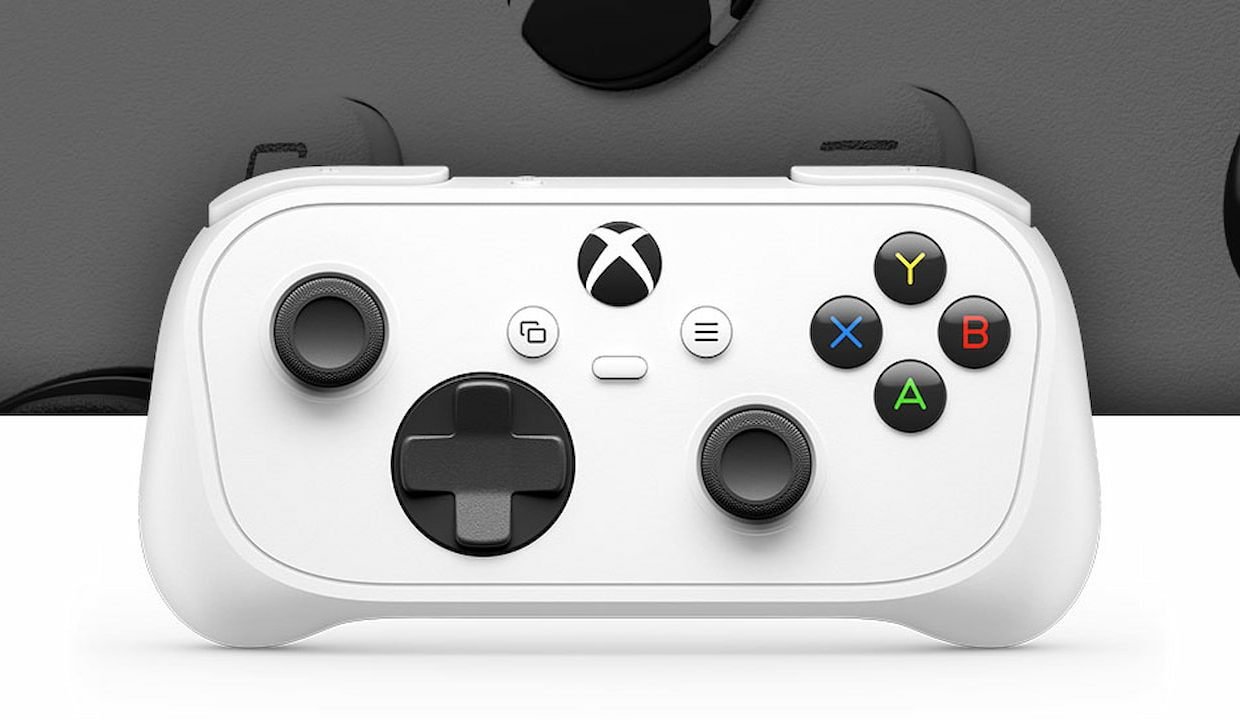
More than just a compact, travel-friendly version of its full-sized counterpart, the Xbox Nano harbors an unexpected capability designed to directly tackle the Achilles’ heel of streaming games. This miniature marvel, engineered for portability and ease of use, initially seemed like a straightforward solution for gamers on the go or those seeking a minimalist setup for their smart TVs. However, an unannounced feature has since come to light, revealing a strategic move by Microsoft to fundamentally enhance the cloud gaming experience. By integrating a direct Wi-Fi connection, the Nano controller bypasses traditional device-to-controller-to-server data paths, forging a more direct link that promises to minimize the dreaded input lag. This development is not merely an incremental upgrade; it represents a thoughtful architectural shift, aiming to deliver a responsiveness previously thought unattainable in streamed games, setting a new benchmark for how ‘Nerd Culture & Entertainment Fans’ interact with their digital worlds.
As the digital frontier of gaming continues to expand, understanding the nuances of hardware innovation becomes crucial. This article delves into the specifics of the Xbox Nano’s secret Wi-Fi function, exploring its implications for latency reduction, its parallels with past cloud gaming endeavors, and what it means for the future of playing your favorite games from anywhere. We will uncover how this seemingly small detail can have a monumental impact on user experience, highlight the benefits for dedicated cloud gamers, and consider the broader trends shaping the industry. Prepare to gain a comprehensive understanding of how the Xbox Nano controller is poised to transform the way you perceive and play cloud-based games.
The Xbox Nano Controller: Redefining Cloud Games Experience
The Xbox Nano controller, recently introduced to the market, represents a significant step in Microsoft’s ongoing commitment to expanding the accessibility and quality of cloud gaming. Conceived as a more portable and compact alternative to the standard Xbox wireless controller, its design inherently targets users who frequently engage with games on various platforms beyond traditional consoles, such as smartphones, tablets, or smart TVs. This focus on portability and versatility makes it an attractive option for a growing segment of ‘Nerd Culture & Entertainment Fans’ who prioritize convenience without sacrificing a familiar control scheme.
While its miniature form factor and travel-friendly nature were its initially publicized attributes, the true innovation lies beneath the surface. The challenge with streaming high-action games, where split-second decisions and precise inputs are paramount, has always been the inherent delay introduced by transmitting data over a network. This latency can transform an exhilarating experience into a frustrating one, particularly for competitive titles or genres demanding quick reflexes. The Xbox Nano directly addresses this core issue with an ingenious, albeit initially unadvertised, feature that promises to elevate the cloud gaming paradigm.
What makes the Xbox Nano ideal for cloud games?
The Xbox Nano controller is uniquely positioned to enhance cloud gaming by integrating a direct Wi-Fi connection. This allows the controller to establish a direct link to Microsoft’s cloud servers, operating in conjunction with the streaming device. By bypassing the traditional route of sending input commands from the controller to the local device and then from the device to the server, the Nano significantly reduces the communication chain, leading to a noticeable decrease in input latency and a smoother experience for cloud-streamed games.
Beyond Miniaturization: The Secret Wi-Fi Advantage
The most compelling, and initially undisclosed, feature of the Xbox Nano controller is its ability to connect directly to Wi-Fi networks. This isn’t merely about using Wi-Fi for general connectivity, but specifically for establishing a direct line of communication with Microsoft’s cloud gaming servers. Traditionally, when you play a cloud game, your controller sends input signals to your local device (like a TV or smartphone), which then processes those signals and sends them over its internet connection to the cloud server. The server then processes the command, renders the next frame, and streams it back to your device.
The Nano’s direct Wi-Fi connection streamlines this process. Instead of adding an extra layer of latency from the device’s internet connection, the controller itself communicates directly with the cloud server. This parallel processing — the device receiving video stream and the controller sending inputs directly — creates a much more efficient and responsive interaction. It’s a subtle but powerful architectural improvement that tackles one of the most critical bottlenecks in cloud gaming, making those action-packed games feel much more immediate and controlled.
Latency: The Unseen Foe in Cloud Gaming
Latency, often measured in milliseconds, is the time delay between an action performed by a player (e.g., pressing a button) and the response observed in the game. In traditional console or PC gaming, this delay is minimal, often imperceptible, as the game processing happens locally. In cloud gaming, however, latency is compounded by several factors: the time it takes for input signals to travel to the cloud server, the server to process them and render the next visual frame, and then for that video stream to travel back to the player’s screen. Even slight delays can significantly impact gameplay, making precise maneuvers difficult and reducing the feeling of “direct” control.
The Xbox Nano’s direct Wi-Fi connectivity aims squarely at mitigating this challenge. By shortening the data’s journey and eliminating the device’s internet connection as an intermediary for control inputs, it directly attacks a key source of latency. This improvement is particularly impactful for genres like fighting games, first-person shooters, or rhythm games, where timing is everything. A reduction in input lag translates directly into a more fluid, enjoyable, and competitive gaming experience, helping cloud gaming close the gap with local play.
A Legacy of Innovation: Drawing Parallels with Cloud Gaming Strategies
The concept of a controller directly connecting to cloud servers to reduce latency is not entirely new within the broader context of cloud gaming. While groundbreaking for the Xbox ecosystem, the Xbox Nano’s approach draws clear parallels with strategies seen in previous ventures into cloud-based entertainment. This lineage of innovation highlights a persistent industry effort to solve the fundamental challenges of streamed interactive experiences, particularly the ever-present issue of input lag that can plague fast-paced games.
One of the most notable historical precedents for the Xbox Nano’s direct Wi-Fi functionality is the Google Stadia controller. Launched in 2019, the Stadia controller featured its own dedicated Wi-Fi chip, allowing it to connect directly to Google’s data centers. This design choice was lauded as one of Stadia’s most technically sound features, offering a tangible reduction in latency compared to controllers that relied on Bluetooth connections to a local device before forwarding commands. The effectiveness of this design demonstrated the clear benefits of such an architecture in mitigating cloud gaming’s inherent delays, even as Stadia itself faced other market challenges. Microsoft’s adoption of a similar principle with the Xbox Nano signifies a validation of this technical solution and a commitment to optimizing the user experience for their own extensive library of games.
How does the Xbox Nano’s strategy compare to past cloud gaming approaches?
The Xbox Nano’s direct Wi-Fi connection for cloud gaming mirrors the strategy employed by the Google Stadia controller. Both leverage a direct server connection, bypassing the local streaming device’s internet, to significantly reduce input latency. This approach tackles a core challenge of cloud gaming by optimizing the data path for controller inputs, aiming to provide a more responsive and fluid experience similar to what Stadia once offered for its games.
The Pursuit of Seamless Play
The drive to create truly seamless cloud gaming has been a central pillar of innovation for companies entering this space. Beyond just reducing latency, it encompasses broader goals: ensuring consistent frame rates, minimizing visual compression artifacts, and providing a robust, interruption-free connection. The direct Wi-Fi feature of the Xbox Nano is a significant leap towards this ideal, proving that developers are actively investing in hardware solutions that complement software advancements in streaming technology. This holistic approach ensures that the entire chain, from input to display, is optimized for peak performance when playing demanding games.
Unveiling the Unannounced: A Strategic Surprise?
Curiously, Microsoft chose not to highlight the direct Wi-Fi connectivity as a primary feature during the Xbox Nano’s initial reveal. This decision led to the functionality being discovered by users, turning it into a positive surprise for many. This could be a strategic move, allowing the feature to gain organic traction and word-of-mouth endorsement from early adopters. Alternatively, it might reflect that the feature is still in its “preview” phase, suggesting that Microsoft intends to fully integrate and publicize it once it’s completely refined for general availability. Regardless of the reasoning, this unexpected revelation has certainly generated buzz within the ‘Nerd Culture & Entertainment Fans’ community, underscoring the innovative potential hidden within new gaming hardware.
Benefits for Cloud Games Enthusiasts
For dedicated cloud games enthusiasts and casual players alike, the Xbox Nano’s direct Wi-Fi feature translates into a tangible improvement in their daily gaming sessions. The primary advantage, as extensively discussed, is the significant reduction in input lag, which has far-reaching positive implications across various gaming genres. This singular technical enhancement can transform a merely playable cloud experience into one that feels intuitive, immersive, and truly responsive, bringing it closer to the fidelity of local console play.
Imagine playing a fast-paced action-adventure game where every dodge, parry, or shot requires precise timing. With reduced latency, these actions register almost instantly, allowing players to execute complex combos and react to in-game events with confidence. Similarly, in competitive multiplayer games, where fractions of a second can determine victory or defeat, the Nano’s ability to minimize delay provides a crucial edge. Beyond performance, the enhanced responsiveness simply makes games more enjoyable, reducing frustration and allowing players to focus on strategy and narrative rather than battling connection delays.
What are the main advantages of using the Xbox Nano for cloud games?
The primary advantage of the Xbox Nano for cloud games is significantly reduced input lag due to its direct Wi-Fi connection to Microsoft’s servers. This enhances responsiveness, making gameplay smoother and more precise, especially in fast-paced genres. Additionally, it offers enhanced portability, a compact design, and a potentially more consistent experience across various streaming devices, improving the overall enjoyment of cloud-based games.
- Reduced Input Lag: The most critical benefit, directly impacting responsiveness and control accuracy.
- Enhanced Portability: Its compact design makes it an ideal companion for cloud gaming on the go.
- Smoother Gameplay: Fewer delays mean more fluid movements, reactions, and overall game flow.
- Improved Competitive Edge: In multiplayer games, lower latency can be a decisive factor.
- Consistent Experience: Potentially offers a more stable and reliable connection for inputs regardless of the host device’s Wi-Fi quality.
- Broader Accessibility: Encourages more users to embrace cloud gaming by removing a major friction point.
Limitations and the Road Ahead for Cloud Games
While the Xbox Nano’s direct Wi-Fi feature offers a compelling leap forward for cloud games, it’s essential to acknowledge its current status and inherent dependencies. As innovative as the technology is, it operates within the broader context of cloud gaming, which still faces a series of challenges that no single piece of hardware can fully resolve. Understanding these limitations is crucial for setting realistic expectations and appreciating the ongoing efforts required to perfect the streamed gaming experience for ‘Nerd Culture & Entertainment Fans’.
The most immediate limitation highlighted in its revelation is the feature’s “preview” status. This indicates that while the technology is functional and demonstrating its benefits, it is not yet fully rolled out to the general public. Being in preview suggests that Microsoft is likely gathering data, refining the connection protocols, and possibly expanding compatibility or stability before a full commercial launch of this specific functionality. This implies that some users may not yet have access, or the experience might be subject to further optimizations. Patience, then, becomes a virtue for those eager to experience its full potential with their favorite games.
What are the current limitations of the Xbox Nano’s cloud features?
The primary limitation of the Xbox Nano’s cloud feature is its “preview” status, meaning it’s not yet fully rolled out to all users and may be subject to ongoing refinements. Furthermore, while the controller optimizes input latency, the overall cloud gaming experience still heavily depends on a stable, high-speed internet connection, server proximity, and the streaming device’s display lag, factors that the controller cannot independently control.
Overcoming the Latency Hurdle
Despite the Nano’s innovation, cloud gaming remains a complex technological endeavor. Factors such as the player’s internet service provider (ISP) quality, the distance to Microsoft’s cloud servers, and even the refresh rate and response time of the display device itself can still introduce latency. While the Nano optimizes the controller input path, it cannot magically eliminate network congestion or physical distances. Therefore, even with the Nano, a robust home network infrastructure and proximity to cloud gaming server regions will continue to be crucial for the absolute best performance when streaming demanding games.
Best Practices for Optimizing Your Cloud Games Experience
Maximizing the potential of the Xbox Nano controller and achieving the most fluid cloud gaming experience goes beyond just having the right hardware. A combination of optimal network setup and smart gaming habits can significantly enhance your enjoyment of streamed games. For ‘Nerd Culture & Entertainment Fans’ looking to squeeze every ounce of performance out of their cloud setup, adopting a few key best practices can make a noticeable difference, transforming good experiences into truly exceptional ones.
The foundation of any superior cloud gaming session is a stable and fast internet connection. While the Xbox Nano tackles input latency, a slow or inconsistent connection will still result in video compression, visual artifacts, and overall poor streaming quality. Prioritizing a wired Ethernet connection for your streaming device whenever possible provides the most reliable bandwidth. If Wi-Fi is your only option, ensuring your router is modern (ideally Wi-Fi 6 or newer) and positioned optimally can dramatically improve signal strength and reduce local network congestion, allowing the Nano to shine with your favorite games.
How can users optimize their cloud gaming with the Xbox Nano?
To optimize cloud gaming with the Xbox Nano, users should ensure a stable, high-speed internet connection, preferably fiber, and utilize a modern Wi-Fi router (Wi-Fi 6/6E) placed strategically. Minimizing other network activity, playing on servers geographically closer to them, and closing unnecessary background applications on the streaming device will further reduce overall latency and improve streaming quality for their games.
| Factor | Impact on Cloud Gaming | Optimization Tip |
|---|---|---|
| Internet Speed & Stability | Directly affects video stream quality and overall latency. | Use fiber internet, wired connection for device if possible. |
| Wi-Fi Router Quality | Influences local network latency and signal strength. | Upgrade to Wi-Fi 6/6E; place router centrally; use 5GHz band. |
| Server Proximity | Physical distance data travels to and from cloud servers. | Choose server regions closest to your location if available. |
| Network Congestion | Other devices/activities consuming bandwidth. | Minimize simultaneous downloads/streams during gaming. |
| Streaming Device Performance | Device’s ability to decode video stream and process data. | Use modern devices with good processing power; close background apps. |
| Display Latency | Time taken for your TV/monitor to process and show the image. | Enable ‘Game Mode’ on your display; use low-latency monitors. |
The Future Landscape of Cloud Games and Hardware Innovation
The introduction of the Xbox Nano controller with its direct Wi-Fi capability is more than just a product launch; it’s a potent signal regarding the future direction of the gaming industry. As technology continues its relentless march forward, the lines between traditional gaming platforms and cloud-based services will increasingly blur. This shift necessitates not only robust backend infrastructure from service providers but also intelligent, purpose-built hardware that can fully leverage the benefits of streaming games.
Microsoft’s investment in a controller designed specifically to mitigate latency for cloud play underscores a strategic vision where cloud gaming isn’t merely an alternative but a primary, high-quality mode of engagement. We can anticipate further innovations in peripheral devices that prioritize connectivity, efficiency, and player comfort for streamed experiences. This trend will likely extend to other forms of hardware, including streaming sticks, dedicated handheld devices, and even smart TV integrations, all optimized to provide low-latency access to an ever-expanding library of games for ‘Nerd Culture & Entertainment Fans’ globally.
What future trends might the Xbox Nano’s technology spark in cloud games?
The Xbox Nano’s direct Wi-Fi technology could spark trends toward more dedicated cloud-optimized peripherals, with increased focus on integrated low-latency wireless solutions in controllers and streaming devices. This could lead to a broader industry shift towards hardware designed specifically to minimize cloud gaming friction, potentially standardizing direct server communication for inputs, and driving innovation in adaptive streaming technologies to further enhance the responsiveness and quality of cloud-based games.
- Integrated Low-Latency Solutions: Expect more controllers and streaming devices to incorporate direct Wi-Fi or similar technologies.
- Dedicated Cloud Gaming Peripherals: A rise in hardware explicitly designed for cloud play, beyond just standard controllers.
- Seamless Device Transitions: Enhanced interoperability allowing effortless switching between different streaming screens.
- Adaptive Streaming Technologies: Innovations that dynamically adjust stream quality and input routing based on network conditions.
- Broader Developer Adoption: Game developers may begin optimizing their games specifically for low-latency cloud environments.
- New Form Factors: Exploration of entirely new portable or minimalist devices built around cloud gaming.
Elevating Your Cloud Games: The Transformative Impact of the Xbox Nano
The Xbox Nano controller, with its understated yet powerful direct Wi-Fi functionality, stands as a testament to the ongoing evolution of gaming hardware. Far from being just another peripheral, it embodies a strategic solution to one of cloud gaming’s most persistent challenges: latency. For ‘Nerd Culture & Entertainment Fans’ who embrace the flexibility and accessibility of streamed games, this miniature joystick represents a significant step towards a truly seamless and immersive experience. By directly addressing input lag, it empowers players to engage with their favorite titles with a level of responsiveness previously confined to local play, blurring the lines between different gaming platforms.
As this feature transitions from its preview phase to widespread availability, its impact on how we perceive and interact with cloud gaming is poised to be transformative. It reinforces Microsoft’s commitment to not only providing a vast library of games through services like Xbox Cloud Gaming but also to perfecting the technical delivery of those experiences. The Xbox Nano is more than a controller; it’s a key that unlocks a smoother, more enjoyable future for cloud gaming, ensuring that the magic of virtual worlds remains intact, regardless of where or on what device you choose to play.
FAQ: Deep Dive into the Xbox Nano and Cloud Gaming
What is the Xbox Nano controller, and why is it significant for gaming?
The Xbox Nano controller is a new, compact version of Microsoft’s standard Xbox joystick, designed primarily for portability and cloud gaming. Its significance for gaming, particularly for ‘Nerd Culture & Entertainment Fans’, lies in its secret direct Wi-Fi connectivity. Unlike traditional controllers that relay inputs through a local device’s internet connection, the Nano can send commands directly to Microsoft’s cloud servers. This bypasses an extra layer of latency, making streamed games feel significantly more responsive and closer to local console play. Its design targets enhanced experiences for cloud-based games on various devices, from portable screens to smart TVs, making high-quality gaming more accessible and enjoyable on the go.
How does the Xbox Nano reduce latency in cloud gaming?
The Xbox Nano controller reduces latency in cloud gaming by utilizing a dedicated, direct Wi-Fi connection. Instead of sending player inputs to a local streaming device (like a smartphone or TV) which then forwards them to the cloud server, the Nano sends these commands directly to Microsoft’s cloud gaming servers. This parallel communication, where the device primarily handles the incoming video stream while the controller handles outgoing inputs, shortens the data’s travel path. By eliminating an intermediary step and reducing the reliance on the host device’s network performance for inputs, it significantly cuts down on input lag, making responses in fast-paced games nearly instantaneous and improving overall playability.
Is the direct Wi-Fi feature of the Xbox Nano available now?
The Xbox Nano controller itself has recently become available in stores. However, its direct Wi-Fi connectivity feature, which significantly reduces latency for cloud gaming, is currently in a “preview” phase. This means that while the functionality exists within the controller, it may not be fully accessible to all users immediately, or its implementation might still be undergoing testing and refinement by Microsoft. The expectation is that this groundbreaking feature will be rolled out to the general public in the near future, allowing a wider audience of ‘Nerd Culture & Entertainment Fans’ to experience its benefits for their cloud games.
Which devices are compatible with the Xbox Nano for cloud gaming?
While the Xbox Nano controller’s primary design is for enhanced cloud gaming, it is expected to maintain broad compatibility with a range of devices that support Xbox Cloud Gaming. This includes popular platforms such as Android smartphones and tablets, iOS devices (via browser), Windows PCs, and smart TVs equipped with Xbox app integration. The compact and portable nature of the Nano makes it particularly well-suited for mobile gaming setups. The direct Wi-Fi feature, specifically for latency reduction, will benefit any device utilizing Xbox Cloud Gaming, as the controller itself handles the optimized input transmission to the server, independent of the host device’s connectivity method for games.
How does the Xbox Nano’s direct Wi-Fi compare to controllers like Google Stadia’s?
The Xbox Nano’s direct Wi-Fi approach for cloud gaming is remarkably similar to the strategy employed by the Google Stadia controller. Both controllers featured an integrated Wi-Fi chip designed to connect directly to their respective cloud gaming servers, bypassing the local streaming device. This shared technical philosophy aimed at minimizing input latency by creating a more direct communication path for player commands. The effectiveness of this design was a highlight for Stadia and now serves as a validated blueprint for Microsoft, demonstrating a consensus in the industry that direct server communication for controllers is a potent solution for enhancing the responsiveness of streamed games for ‘Nerd Culture & Entertainment Fans’.
What are the potential disadvantages of the Xbox Nano’s cloud features?
While the Xbox Nano’s cloud features offer significant advantages, potential disadvantages primarily stem from its current “preview” status, which means the feature might not be fully optimized or universally accessible yet. Furthermore, despite its direct Wi-Fi connection, the overall cloud gaming experience still relies heavily on external factors. These include the user’s internet service provider’s speed and stability, their geographic proximity to Microsoft’s cloud servers, and the inherent latency of the streaming device’s display. The controller optimizes input lag, but it cannot fully negate these other variables. Therefore, a poor network environment might still hinder the ideal experience, even with the Nano for cloud games.
Will the direct Wi-Fi feature become standard for other Xbox controllers?
Given the promising benefits for cloud gaming enthusiasts and the strategic importance of cloud services for Microsoft, it is plausible that the direct Wi-Fi feature seen in the Xbox Nano could eventually become a standard or an option for other Xbox controllers. As cloud gaming continues to grow and gain mainstream acceptance among ‘Nerd Culture & Entertainment Fans’, optimizing the core input experience will be paramount. Integrating such a feature into future iterations of standard Xbox controllers or even offering it as an upgrade for existing ones would allow Microsoft to unify the low-latency cloud gaming experience across its entire hardware ecosystem, solidifying its position in the evolving games market.
The Next Smart Move for Cloud Gaming Enthusiasts
The revelation of the Xbox Nano controller’s direct Wi-Fi capability is far more than a technical footnote; it’s a clear signal that the future of playing high-quality games from the cloud is becoming increasingly robust and responsive. For ‘Nerd Culture & Entertainment Fans’ who have long dreamed of console-level fluidity on any screen, this miniature powerhouse offers a tangible leap forward. By actively dismantling the latency barriers that have historically hindered cloud gaming, Microsoft is not just releasing new hardware, but actively shaping the technological foundation for the next generation of interactive entertainment. As this innovative feature moves beyond its preview phase, the Xbox Nano is set to become an essential tool for anyone serious about experiencing their favorite games without compromise, wherever they choose to play.












Post Comment